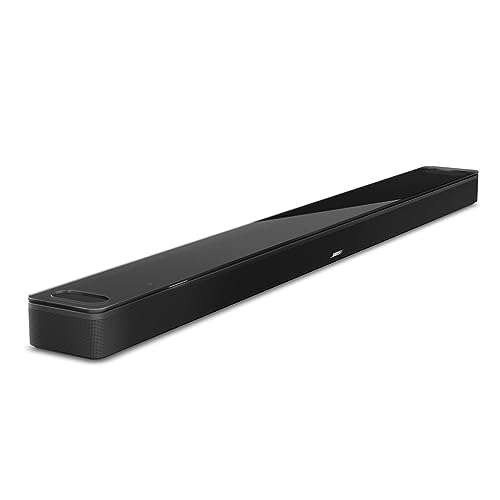
The Bose Smart Ultra Soundbar is Bose’s top-of-the-line soundbar for movies and music. Bose describes it as combining Dolby Atmos with its own TrueSpace processing in a slim bar with a tempered glass top. This profile summarizes what Bose publishes, explains the trade-offs, and helps you decide whether it fits your TV and room.
This profile rests on published sources, not on our own use of the soundbar. The facts below come from Bose’s product page, and we call out where a claim is Bose’s own. To see where it lands against other models, read our best soundbars of 2026 comparison.
The Short Version
The Smart Ultra is a single-bar Dolby Atmos system that leans on software for much of its immersion. It has nine speakers, two of them firing upward, plus A.I. Dialogue Mode, ADAPTiQ room calibration and a broad set of streaming options. Because it has no video inputs, it behaves like a clean audio endpoint for your TV.
It suits mid-size rooms and buyers who value clear voices and an elegant design. It is less suited to people who want to plug game consoles into the bar or to those with large open rooms who want built-in surround speakers. For a Sonos alternative with a stronger expansion story, see our Sonos Arc Ultra profile.
Key Specs According to Bose
- Speakers: Nine speakers in total, two of them upward-firing, plus a center tweeter, according to Bose’s comparison table.
- Surround: Dolby Atmos support, plus TrueSpace processing that upmixes stereo, 5.1 and other non-Atmos signals to add a sense of height.
- Dialogue: A.I. Dialogue Mode, which Bose says senses when dialogue is happening and balances voice and surround sound.
- Calibration: ADAPTiQ audio room calibration, run during initial setup with the included headset.
- Size: 2.29 inches high, 41.14 inches wide and 4.21 inches deep, at 12.68 lbs.
- Connections: HDMI eARC cable and optical cable in the box, Bluetooth 5.0 with a stated range of 33 feet, Wi-Fi and Ethernet. Bose lists Apple AirPlay 2, Spotify Connect and Chromecast for streaming.
- Voice and control: Voice control, a remote or the app. Bose supports Alexa and Google voice through compatible devices.
- Suggested room size: 12 by 14 feet, according to Bose.
- In the box: The soundbar, HDMI eARC cable, optical cable, ADAPTiQ headset, power cord, remote with battery and a quick start guide.
What Makes It Different
TrueSpace for Everything You Watch
Dolby Atmos only helps when the content is mixed for it. Bose’s answer is TrueSpace, which analyzes non-Atmos signals and upmixes them to create an immersive multichannel sound with a sense of height. Bose says it will take any content, regardless of how it was encoded, and deliver an Atmos-like experience. That is a manufacturer claim, but the feature is a sensible fit for people who watch a lot of regular TV, sports and older shows.
A.I. Dialogue Mode
Bose says A.I. Dialogue Mode uses artificial intelligence to sense when dialogue is happening and automatically balance voices and surround sound, so you can hear dialogue clearly without sacrificing the immersive elements. Dialogue clarity is one of the most common reasons people buy a soundbar, so this is a headline feature. Bose also notes that the 900 model has the same features but lacks A.I. Dialogue Mode.
ADAPTiQ Calibration
Bose includes a headset for ADAPTiQ, which it says optimizes the system’s sound to your specific room during setup, whatever the room’s shape or furnishings. Calibration is a real advantage when your room has odd walls or lots of hard surfaces. The Bose Smart Soundbar 600 does not offer it, according to Bose.
Personal Surround Sound and SimpleSync
Bose says you can pair the soundbar with Bose Ultra Open Earbuds, sold separately, for a personal surround layer. SimpleSync connects the soundbar to compatible Bluetooth headphones for private listening, or to smart speakers for group listening. Both are optional extras, but they matter in shared homes.
Setup and Connections
You connect the soundbar to the TV through HDMI eARC, and Bose supplies both HDMI and optical cables. There is a catch. According to Bose, the soundbar does not pass video through, and you cannot connect devices like a cable box or gaming system directly to it. Every source must plug into the TV, with one cable running from the TV to the soundbar. That works well when you have a modern TV with enough HDMI ports, but it can be annoying if your TV is short on inputs.
Use eARC for the best format support. Optical is a fallback and, as a general rule, does not carry full Dolby Atmos.
The soundbar can also join a multiroom group with other Bose smart speakers and soundbars through the Bose app. It has built-in Ethernet, according to Bose, which helps if your Wi-Fi is crowded.
Adding Bass and Mounting
The Smart Ultra is a single-bar system. Bose offers the Bass Module 500 and Bass Module 700 as wireless add-ons, and says they work with the soundbar using the same wireless protocols. You can connect two modules of the same type if you want even more bass. Bose advises putting a bass module on the floor along the same wall as the TV, closer to walls and corners for more bass or farther away for less.
For wall mounting, Bose sells the Soundbar Wall Bracket. At 41.14 inches wide, the bar suits TVs from roughly 50 inches up, though that sizing is our judgment, not a Bose rule.
Pros and Cons
Pros
- Dolby Atmos with upward-firing speakers and TrueSpace upmixing
- A.I. Dialogue Mode for voice clarity
- ADAPTiQ room calibration with included headset
- Wi-Fi, Ethernet, AirPlay 2, Chromecast and Spotify Connect
- Optional wireless Bass Module and wall bracket
- Tempered glass top and refined finish
Cons
- No video passthrough, so every source must plug into the TV
- No subwoofer or rear speakers in the box
- Suggested room size tops out at 12 by 14 feet
- Needs the Bose app for setup and settings
- Accessories add to the total cost
Who Should Buy It
Pick the Smart Ultra if you want a single-bar Atmos soundbar that makes dialogue clear, looks refined under a mid-to-large TV, and plays music over Wi-Fi. It suits living rooms near Bose’s suggested size and households that like to stream music with AirPlay 2 or Chromecast.
Look elsewhere if you want HDMI inputs on the bar, a boxed subwoofer, or true rear speakers from day one. Our Samsung HW-Q990F profile covers a full system, and the Sonos Arc Ultra profile covers a rival single bar with its own expansion path.
What to Check Before You Buy
- TV ports: You need an HDMI eARC or ARC port, plus enough HDMI inputs on the TV for all your devices.
- Room size: Compare your room to Bose’s suggested 12 by 14 feet.
- Mounting: If you want it on the wall, buy the Bose bracket and check your TV’s layout.
- Bass: Decide whether you will add a Bass Module 500 or 700.
- App: Have a phone ready for the Bose app and ADAPTiQ setup.
You can see the current price and color options here: Bose Smart Ultra Soundbar on Amazon. Buying through our link may earn a commission at no cost to you.
Sources