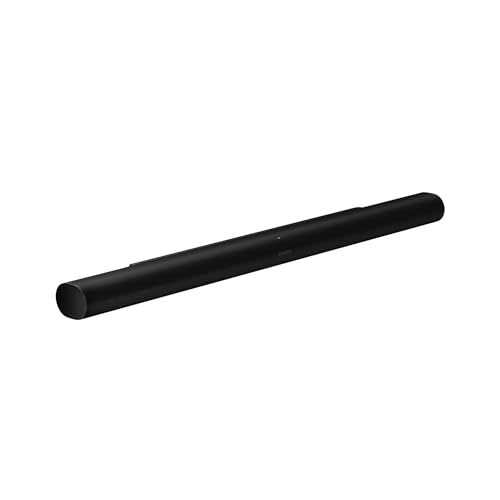
The Sonos Arc Ultra is the company’s top soundbar, and it is built around a single idea: get Dolby Atmos height effects and deep bass out of one long, low bar, then let you grow the system with Sonos speakers later. This profile summarizes what Sonos publishes about it and points out who should choose it and who should look elsewhere.
This profile rests on published sources, not on our own use of the soundbar. Everything below comes from the Sonos product page, and we flag where it is silent. For where it ranks against other models, see our best soundbars of 2026 comparison.
The Short Version
The Arc Ultra is a premium Dolby Atmos soundbar for people who want a polished, app-driven system and a clear upgrade path. On its own it is already a large, ambitious bar. With a Sonos Sub and a pair of Era 300 speakers, it becomes the full surround system that Sonos promotes on its product page.
It is not a bargain bar, and it is not the simplest. It rewards buyers who like the Sonos ecosystem, own a mid-size or large TV and want one brand to handle TV sound, music and multiroom listening. If you want a smaller or more affordable Sonos bar, our Sonos Beam (Gen 2) profile covers the compact option.
Key Specs According to Sonos
These details come from the Sonos Arc Ultra product page.
- Drivers: 14 Sonos-engineered drivers: nine silk-dome tweeters (two firing upward for height), six midwoofers and the Sound Motion woofer. Sonos lists fifteen Class-D amplifiers.
- Surround format: Dolby Atmos, which Sonos describes as a 9.1.4 spatial audio experience. Dolby TrueHD and Dolby Atmos via TrueHD are supported over HDMI eARC.
- Bass: Sound Motion is a four-motor, dual-membrane woofer. Sonos says it gives deeper bass in a smaller package than the previous Arc.
- Size: 46.38 inches wide, 2.95 inches high and 4.35 inches deep, at 13.01 lbs.
- Connectivity: HDMI eARC, Wi-Fi 6, Bluetooth 5.3 and AirPlay 2. Optical needs an adapter sold separately.
- Voice: Sonos Voice Control and Amazon Alexa.
- In the box: The bar, a 6-foot power cable and a 4.9-foot HDMI cable.
What Makes It Different
Sound Motion Bass in a Flat Bar
The Arc Ultra’s headline feature is Sound Motion, a woofer design Sonos developed to get more bass from a thin enclosure. According to Sonos, it frees space for extra tweeter and midrange drivers, which widens the soundstage compared with the previous Arc. Sonos says the bar’s drivers, with two of the tweeters firing upward, create dedicated height channels for spatial audio.
Treat the bass claims as manufacturer claims. Without a subwoofer, no soundbar of this size will behave like a dedicated sub, and Sonos itself positions the Sonos Sub as the way to get bass you can feel.
Speech Enhancement and Night Sound
Sonos says Speech Enhancement uses AI to detect the human voice and clarify dialogue, with four customizable levels in the Sonos app. Night Sound reduces the intensity of loud sounds and raises quieter ones, which helps when you are watching late at night. Both are practical features for apartments and shared homes.
Trueplay Tuning
Trueplay measures the acoustics of your room and fine-tunes the EQ using the Sonos app. Sonos says the Arc Ultra supports it on both iOS and Android. On the older Beam, the page says a supported iOS device is required, so the Arc Ultra has the wider reach here.
TV Audio Swap to Headphones
Sonos says you can swap TV audio from the Arc Ultra to Sonos Ace headphones for private surround sound with head tracking, and that you can connect two pairs at once. It is a nice extra if one person is awake while another sleeps. You need to own the headphones, which are sold separately.
Setup and Connections
Sonos describes setup as plugging in the power cable, connecting the TV with the included HDMI cable and finishing in the Sonos app. You use the TV’s HDMI eARC or ARC port. The Sonos spec list shows a single HDMI eARC connection and no extra HDMI inputs, so you plug sources like an Apple TV, a game console or a Fire TV into the TV, not the bar.
That setup matters for Dolby Atmos. Sonos says Atmos and several lossless formats require an HDMI eARC connection. If your TV has only a regular ARC port, check the TV’s manual to see which audio formats it can pass back. Check your TV’s audio settings too, since some TVs downmix by default instead of passing the original audio through.
The bar also syncs with your existing TV remote, so you do not need a second remote for daily volume changes. Touch controls on the bar cover play, pause, skip and volume, and a physical switch on the back cuts power to the microphones.
Expanding the System
Sonos pairs the Arc Ultra with a Sonos Sub and Era 300 rear speakers on its product page, and it sells bundles that include the bar with those pieces. For TV use, a sub adds low-frequency impact that a bar this thin cannot fully deliver, and rear speakers add real surround channels rather than virtualized ones.
Because the products connect over Wi-Fi, you can start with the bar and add speakers later, then move them into other rooms or group them for whole-home audio. The Arc Ultra also works as a standalone music speaker, with Wi-Fi, Bluetooth and AirPlay 2 for streaming from iPhone, iPad or Mac.
Pros and Cons
Pros
- Atmos with dedicated upward-firing drivers and a 14-driver layout
- Strong expansion path with a Sonos Sub and Era 300 rears
- Wi-Fi 6, Bluetooth 5.3 and AirPlay 2 for music
- Speech Enhancement, Night Sound and Trueplay tuning
- Works with your existing TV remote
- Wall mount available from Sonos
Cons
- No subwoofer included
- Large footprint at over 46 inches wide
- One HDMI eARC port only, optical adapter sold separately
- The best experience depends on buying more Sonos hardware
- App-based setup and control, which some buyers find fussy
Who Should Buy It
The Arc Ultra suits buyers with a TV around 55 inches or larger who want a clean, single-bar look and the option to add a sub and rear speakers. Our rough guide is that the 46-inch width looks proportionate under big screens, though that is our own judgment, not a Sonos rule. It also suits people already invested in Sonos for music, since the bar joins the same app and multiroom setup.
It is a weaker fit for small TVs, for bedrooms where space is tight and for buyers who want a boxed subwoofer and surround speakers included from day one. In that case, look at a bar sold as a full system. Our Samsung HW-Q990F profile covers an 11.1.4 system with a sub and rear speakers included, and our Bose Smart Ultra Soundbar profile covers a rival single-bar Atmos option.
What to Check Before You Buy
- TV width and stand: Compare your stand against the 46.38-inch width and 2.95-inch height.
- HDMI port: Confirm your TV has an HDMI eARC or ARC port and that Atmos pass-through is turned on.
- Wall mount: If you plan to mount the bar, buy the Sonos wall mount and check outlet and port access.
- Add-ons: Decide whether you will add a sub and rears, and budget for them up front.
- Phone: You need the Sonos app on a compatible phone for setup and Trueplay.
You can see the current price and color options here: Sonos Arc Ultra on Amazon. Buying through our link may earn a commission at no cost to you.
Sources