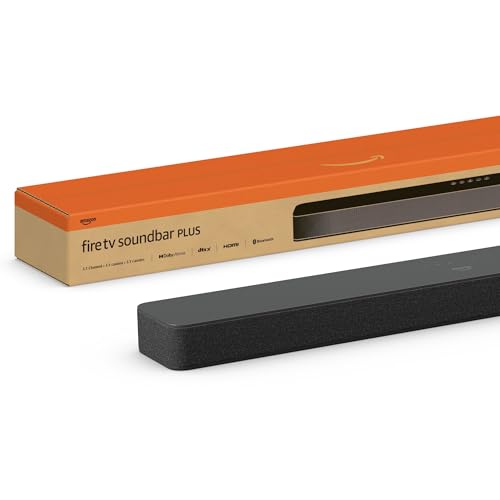
The Amazon Fire TV Soundbar Plus is Amazon’s step-up soundbar. It is a 37-inch, 3.1-channel bar with built-in subwoofers, Dolby Atmos and DTS:X support and a simple connection set. Despite the Fire TV branding, it has no Fire TV software and no Alexa. This profile summarizes what Amazon, Notebookcheck, TechRadar and What Hi-Fi report about it, and it points out where the critics disagree, which they do sharply.
This profile rests on published sources, not on our own use of the soundbar. We compared the specifications and opinions published by others, which we cite at the end. For how it compares with the rest of our picks, see the best soundbars of 2026 comparison.
The Short Version
The Fire TV Soundbar Plus is a large, easy-to-install bar aimed at shoppers who want a simple upgrade for a mid-sized or big TV. In the base configuration, the bar has a built-in subwoofer, so there is nothing else to place or pair. If you want more bass or surround, Amazon sells bundles that add a wireless subwoofer or a subwoofer and two rear speakers.
The catch is sound quality, and here the published opinions are divided. TechRadar called it a solid soundbar at a decent price, with an immersive surround presentation in the 5.1 configuration it covered. What Hi-Fi came away with a far harsher verdict, describing thin bass and a shrill sound that it felt was worse than most TV speakers. If you are sensitive to sound quality, that disagreement is worth taking seriously. If you want plug-and-play simplicity and a wide bar, the Plus is easy to live with.
Key Specs
These details come from Notebookcheck’s report on Amazon’s launch, TechRadar’s spec table and What Hi-Fi’s spec list.
- Channels: 3.1 for the bar alone, with built-in subwoofers. What Hi-Fi lists three full-range speakers, three tweeters and two subwoofers under the grille.
- Size: about 37 inches wide. TechRadar lists 37 x 5.2 x 2.5 inches. What Hi-Fi lists 2.5 x 37 x 5.2 inches (6.4 x 94 x 13.2 cm, height by width by depth) and a weight of about 8.8 pounds (4 kg).
- Formats: Dolby Atmos, DTS:X and DTS TruVolume, with a dedicated dialogue channel and Dialogue Enhancer, per Notebookcheck.
- Connections: HDMI eARC/ARC, optical, USB and Bluetooth.
- Sound modes: Movie, Music, Sports and Night, with bass, treble, surround and dialogue controls on the remote.
- In the box: per TechRadar, the base package includes a power cable, HDMI cable, remote, batteries and a mounting kit.
- Not included: Alexa, Fire TV software, built-in streaming or an app.
One source conflict is worth flagging. Notebookcheck and What Hi-Fi describe the bar itself as a 3.1 design with built-in subwoofers. TechRadar describes the base package as a standalone soundbar and the next tier as the one adding a wireless subwoofer. Both statements can be true, because the bundles add an external, wireless sub on top of the bar’s own drivers, so check the listing to see exactly which configuration you are buying.
What the Critics Say
The most useful thing to know about this product is how far apart two published verdicts are.
What Hi-Fi listened to the bar alongside a Sony model and was unimpressed. Its write-up describes bass that was flappy and thin, a shrill upper midrange and sound that became unpleasant when the volume went up. It did praise the wide sense of space and the clear dialogue, and said both were improvements over most TV speakers, but concluded that most TV speakers would be preferable overall. That is a very strong criticism for a soundbar.
TechRadar looked at the full 5.1 system and took a milder view. It said the performance was good but not great, with plenty of bass from the subwoofer, a slightly lacking high end and a stereo image that was a bit narrow, but an immersive, enjoyable surround presentation from the rear speakers. It also called setup among the easiest it had come across, because everything arrives already paired.
The two are not strictly comparable. TechRadar’s verdict leans on the rear speakers and subwoofer in the 5.1 bundle, while What Hi-Fi evaluated the bar. If you are buying only the bar, the What Hi-Fi account is the more relevant one. If you are buying the bundle with surrounds, TechRadar’s is.
Atmos Without Up-Firing Speakers
Both TechRadar and What Hi-Fi make the same point: the Dolby Atmos support is virtual. The bar has no up-firing drivers, so it processes the signal to suggest height rather than bouncing sound off the ceiling. TechRadar said it did not notice a vertical sense of space with Atmos soundtracks, and that the bar would not belong on a list of the best Atmos soundbars. What Hi-Fi found the Atmos effect relatively impressive for a bar without up-firing speakers, noting that it could track a plane moving across the screen.
Practically, treat Atmos support as a format compatibility feature, which means the soundbar can accept the signal, not as a promise of overhead sound. If height effects matter to you, a bar with up-firing drivers, such as the Polk Signa S4, is built for it.
Controls and Connections
There is no app. Everything is done from the remote and a few buttons on the top of the bar. TechRadar lists the top buttons as power, source, Bluetooth and volume up and down. The remote carries the rest, including bass and treble levels, a surround on and off button and volume, EQ presets and a dialogue button. Both TechRadar and What Hi-Fi note that the display is only LED lights, with a voice prompt when you change settings. What Hi-Fi found that cycling through settings with the remote quickly becomes tiresome.
On the back are an HDMI port that works with ARC and eARC, an optical input and a USB port. TechRadar noted it would have liked a second HDMI port for passthrough. Notebookcheck adds that owners of a compatible Fire TV can use the Fire TV remote to control the soundbar, and TechRadar says that with certain Fire TVs you can fine-tune the audio in the TV’s settings.
Here is how it fits with common setups.
- Fire TV, Roku, Apple TV or a game console: plug the device into the TV, and the TV sends audio to the soundbar over eARC or ARC. The soundbar does not need to know what the source is.
- Samsung, LG, Sony, TCL or Hisense TV: the same. Connect the soundbar to the TV’s ARC or eARC port and choose it in the sound settings.
- Older TV: use the optical input. Optical cannot carry Atmos, so you will get standard surround or stereo from it.
- PC monitor: most have no HDMI ARC. Bluetooth works, and so does optical if your computer offers it.
Size, Mounting and Placement
At 37 inches wide, the bar suits a TV from about 40 inches up, and it is well matched to TVs around 50 to 65 inches. It weighs about 8.8 pounds (4 kg), according to What Hi-Fi, so it feels solid. Notebookcheck and TechRadar both say a wall mount kit is included, but TechRadar notes it is for the soundbar alone.
What Hi-Fi advises against placing the bar in a cabinet or on a shelf with another above it, even though there are no up-firing drivers. Give the bar open space in front and above.
Options and Bundles
According to Notebookcheck, Amazon sells the Plus on its own, with an external subwoofer, or with a subwoofer and two surround speakers for a home theater setup. TechRadar confirms that all three configurations are available in the US, and that the bundles are already paired, so each unit only needs to be plugged in. If you start with the base bar and want more later, check the current listings, because we cannot confirm from our sources whether the accessories are sold separately for the bar alone.
Pros and Cons
Pros
- Built-in subwoofers in a single wide bar
- Very easy setup, with remote control of bass, treble and dialogue
- eARC, optical, USB and Bluetooth connections
- Wall mount kit included
- Can be expanded through bundles
Cons
- What Hi-Fi found the sound thin, shrill and worse than most TV speakers
- Virtual Atmos only, with no up-firing speakers
- No app, Alexa, streaming or second HDMI input
- Settings only through the remote
- Critics disagree, so quality is a risk for sensitive listeners
Who Should Buy It
The Plus makes sense for someone who wants a simple, wide soundbar with a subwoofer built in, who does not need smart features and is not a critical listener. It fits a bedroom, a second TV or a family room where dialogue and bass matter more than refinement, and it is attractive to anyone who likes the idea of adding surrounds later.
It is a weaker pick for people who care about music, who want true overhead Atmos or who want Wi-Fi features. For a compact option with a clearer reputation, see the Bose TV Speaker (2nd Gen) profile, which focuses on dialogue.
What to Check Before You Buy
- Configuration: confirm whether the listing is the bar alone, with a subwoofer or with surrounds.
- TV ports: you need HDMI ARC or eARC, or an optical output.
- Width: measure for a 37-inch bar.
- Return policy: given the split opinions, make sure you can return it if the sound disappoints.
- Expectations: no Alexa, no app and no second HDMI input.
You can see the current price and variants here: Amazon Fire TV Soundbar Plus on Amazon. Buying through our link may earn a commission at no cost to you.
Sources