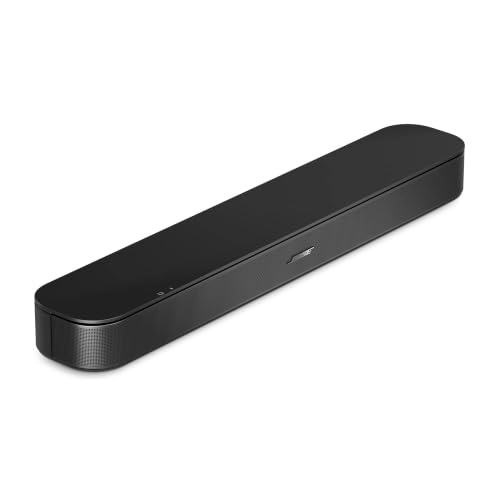
The Bose TV Speaker (2nd Gen) is a compact, plug-and-play soundbar built to make a TV easier to listen to. It does not try to be a home theater. There is no subwoofer in the box, no app, no voice assistant and no Wi-Fi. What Bose promises instead is clearer speech, a wider sound than the TV’s own speakers and a setup that takes a few seconds. This profile lays out what Bose says the product does, what the page leaves out and which rooms it suits.
This profile rests on Bose’s official page, not on our own use of the soundbar. We organized the specifications and FAQ answers into a plain-English guide, noting where the page is silent. For a ranking against the rest of the lineup, see the best soundbars of 2026 comparison.
The Short Version
This is a soundbar for people whose main complaint is “I can’t understand what they are saying.” Bose built the 2nd Gen around that problem: angled left and right speakers for width, a center-channel tweeter dedicated to speech and a Dialogue Mode that separates voices from background audio, according to Bose. The result, Bose says, is TV audio that is clearer and has deeper bass than the TV alone.
It is also small in footprint. The soundbar measures about 23.5 inches wide and weighs about 4.4 pounds. It fits in front of a TV on a dresser, console or small stand. The trade-off is that it is a modest system. If you want a big, room-filling system, a bar with a subwoofer will do far more. Our Polk Signa S4 profile covers one that includes a wireless sub.
Key Specs According to Bose
These details come from Bose’s official product page for the TV Speaker (2nd Gen).
- Type: compact soundbar with full-range speakers and a dedicated center-channel tweeter.
- Size: 2.244 inches high, 23.465 inches wide and 4.154 inches deep, weighing 4.409 pounds.
- Connections: HDMI ARC with HDMI-CEC, optical audio (cable sold separately) and Bluetooth.
- Sound feature: Dialogue Mode, which Bose says enhances speech by separating vocals from background audio.
- Remote: a small IR remote with the battery pre-installed.
- In the box: the soundbar, the remote, an HDMI cable, a power cord and a quick start guide.
- Voice assistant and microphone: none.
- Wall mounting: possible with the Bose Soundbar Wall Bracket, sold separately.
Bose’s page does not list a Dolby Atmos or surround mode, a headphone output, an aux input or a USB port. Some retail listings describe the product with additional features, so rely on Bose’s own page for what is certain and check the listing for anything else you need.
What “Compact” Means in Practice
At roughly two feet wide, the bar is narrower than a typical 32-inch TV, so it suits small sets, and it can still sit in front of larger ones because it is low and shallow. Its depth of about 4.2 inches means it fits on most media consoles. Bose says it works best centered under the TV on a flat, stable, level surface, and recommends placing it near the front of the table or mantle. Bose also advises against mounting the soundbar above the TV.
That last point matters for wall-mounted TVs. If your TV is on the wall with no shelf below it, you can use Bose’s wall bracket, sold separately, and mount the bar beneath. If you have a deep shelf or a cabinet, keep the bar near the front edge so the sound is not trapped behind a lip.
Dialogue Mode and the Center Tweeter
The 2nd Gen’s most specific upgrade, according to Bose, is a center-channel tweeter dedicated to speech. In a typical TV, voices share the same small speakers as music and effects, which is why they get buried. By giving speech its own driver, the soundbar aims to keep dialogue in front of the sound field. Dialogue Mode goes a step further by separating vocals from the background audio, which Bose says means you will not miss a word.
For many households, this is the whole reason to buy. If you turn up the volume for conversations and then jump when an action scene starts, a soundbar with a dialogue feature is the simplest fix. It also helps if someone in the home is hard of hearing, though we make no medical claims, and nothing in Bose’s description promises a specific hearing benefit.
Connecting It
Setup is the strong point. Bose says the TV Speaker (2nd Gen) has just one connection to your TV and takes seconds to set up with the included HDMI cable.
- HDMI ARC: plug the cable into the HDMI port on your TV labeled ARC or eARC. Bose says HDMI-CEC support lets you use your existing TV remote for volume and power. Check your TV’s settings if the remote does not control it; CEC is often named differently by each brand, such as Anynet+ on Samsung or Simplink on LG.
- Optical: for older TVs without ARC, you can use an optical cable, but Bose does not include one.
- Bluetooth: press the Bluetooth button on the included remote to pair a phone or tablet for music.
- Fire TV, Roku and Apple TV: these devices plug into your TV’s HDMI input, not the soundbar. The soundbar receives the sound back through ARC, so it works with all of them without any extra step.
- Game consoles: same principle. Connect the console to the TV, then let ARC carry the sound to the bar. Bose’s page does not describe a game mode or low-latency feature, so check for lip-sync lag, and adjust the audio delay setting in your TV or console if needed.
- PCs and monitors: a typical monitor has no ARC. This soundbar has no USB or aux input, so the options are Bluetooth or optical, and a USB soundbar like the Razer Leviathan V2 X is a more natural fit for a desk.
What It Leaves Out
A short list of absent features is more useful than a long list of present ones.
- No subwoofer is included. Bose says the soundbar delivers deeper bass than the TV alone, but a compact bar has physical limits. Bose’s own page does not list a compatible add-on subwoofer for this model, so do not plan on adding one.
- No Wi-Fi or app. It is a Bluetooth-only device, so you will not find AirPlay, Chromecast or multiroom features.
- No voice assistant. Bose’s FAQ says it does not support voice assistants and there is no microphone.
- No HDMI input. Everything runs through the TV.
None of these is a flaw if you expect them. They become a problem when someone buys the soundbar thinking it is a smart speaker with a TV connection.
Pros and Cons
Pros
- Compact, light and easy to place
- Dedicated speech tweeter and Dialogue Mode
- One-cable HDMI ARC setup with CEC remote control
- Bluetooth for music
- HDMI cable and remote included
Cons
- No subwoofer, Wi-Fi, app or voice assistant
- Only HDMI ARC, optical and Bluetooth on Bose’s page
- Optical cable is not included
- Not for mounting above the TV
- Not a fit for outdoor use
Who Should Buy It
The Bose TV Speaker (2nd Gen) is for a household that wants better TV audio with little effort. It suits a bedroom, a dorm, a den, a kitchen counter TV or a parent’s living room, and it suits anyone who values a short, easy setup over features. People who stream most of their shows through the TV’s own apps will find that the soundbar fits right in, since the TV handles the apps and the soundbar handles the audio.
It is not the right pick for movie fans who want deep bass, surround effects or Atmos, for people who want Wi-Fi music, or for a PC desk. For a bigger step up, the Polk Signa S4 profile is a better match.
What to Check Before You Buy
- TV ports: you need an HDMI ARC or eARC port, or an optical output and a cable.
- Remote control: confirm that your TV has HDMI-CEC and that it is switched on.
- Placement: you need a flat surface in front of the TV, or a wall bracket (sold separately).
- Expectations: this is a speech-focused upgrade, not a home theater.
- Cable: the HDMI cable is in the box, but an optical cable is not.
You can see the current price and variants here: Bose TV Speaker (2nd Gen) on Amazon. Buying through our link may earn a commission at no cost to you.
Sources