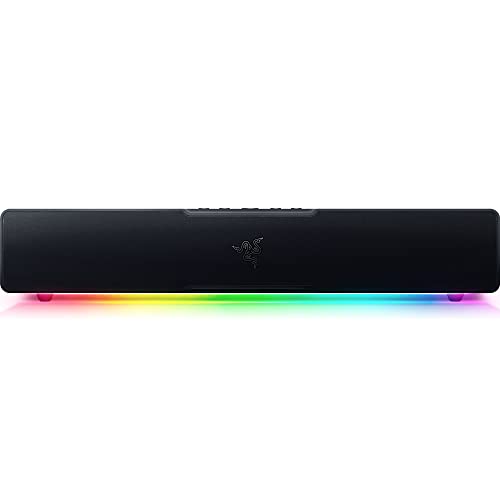
The Razer Leviathan V2 X is the small member of Razer’s Leviathan V2 family: a 15.7-inch (400 mm) PC soundbar that gets power and audio through a single USB-C cable. It has two full-range drivers and two passive radiators, Bluetooth 5.0 for a phone or a Nintendo Switch and Chroma RGB lighting. This profile covers what Razer says about it, what it does not include and who it suits.
This profile rests on Razer’s official product page, not on our own use of the soundbar. We organized the specifications and FAQ answers into a plain-English guide, noting where the page is silent. For how it compares with the other soundbars in our lineup, see the best soundbars of 2026 comparison.
The Short Version
The Leviathan V2 X is a tidy desk upgrade. It is small enough to fit under a monitor, simple enough to plug in with one cable and styled for a gaming desk. If your laptop or monitor speakers are thin and you want something clearer without a subwoofer and a second power brick, this is what Razer built it for.
It is not a bass machine and not a TV soundbar. There is no subwoofer, and Razer lists only USB-C and Bluetooth, so you cannot connect it to a TV over HDMI or optical. If you want bass for a PC, the Razer Leviathan V2 profile covers the version with a subwoofer. If you want a bar for a living-room TV, the Polk Signa S4 is the better category.
Key Specs According to Razer
These details come from Razer’s official page for the Leviathan V2 X.
- Size: about 15.7 inches (400 mm) long, called the most compact soundbar in the Leviathan V2 range.
- Drivers: two full-range drivers and two passive radiators.
- Connection: one USB Type-C cable for both power and audio, plus Bluetooth 5.0.
- Output: a volume output of 90 dB at about 3.3 feet (1 m), according to Razer.
- Lighting: Chroma RGB with 14 lighting zones.
- Buttons: source, Bluetooth, power and volume.
- Software: Razer Audio App and Razer Synapse, for lighting and for switching audio devices.
- Colors: black, and a Kuromi edition.
The page does not list a weight or a frequency range in the text we read, and it does not mention THX Spatial Audio, a subwoofer or a 3.5 mm input for this model.
One Cable, With a Condition
The headline convenience is single-cable USB-C. Razer says the bar draws power efficiently from the cable and delivers the 90 dB maximum output. It adds a caveat that matters: the soundbar’s power depends on what is plugged in, whether that is a USB-C wall charger, a PC, a laptop or a monitor.
In practice, that means a laptop port, a powered USB-C monitor and a charger can behave differently. If the port supplies less power, you may not reach the maximum volume. Razer does not say what happens in that case, so if you want the loudest possible output, a wall adapter or a stronger port is the safer choice. Also check that the cable you use carries both power and audio, because some USB-C cables are charge-only.
Sound and Drivers
Razer pairs two full-range drivers with two passive radiators. Passive radiators are unpowered cones that move with the air pressure inside the cabinet, and they extend bass in a small enclosure without a dedicated sub. That said, a 15.7-inch bar can only do so much, and Razer’s page does not claim deep bass. Treat it as a clear upgrade over a laptop or monitor speaker, particularly for voices, games and casual music, rather than as a replacement for a speaker and subwoofer set.
Razer says the bar delivers a wide soundstage for its size. That is the company’s claim, and we have no independent data to add. If sound quality is your top priority, look at the Leviathan V2 with a sub, or a full desktop speaker set.
Connecting It
- PC or laptop: connect with the USB-C cable. Razer lists USB-C as the PC audio route.
- Phone or tablet: pair over Bluetooth 5.0 through the Razer Audio App.
- Nintendo Switch: Razer lists it as a Bluetooth device.
- Switching between devices: set a secondary playback device in Synapse, then press and hold the Source button.
- Monitor with USB-C: Razer says power depends on the source, and it names monitors as an example, so a USB-C monitor with a powered port can work.
- TV, PlayStation, Xbox: Razer’s page lists no HDMI, optical or aux input, so we would not count on any of them. Check Razer support before assuming Bluetooth from a console works.
- Mac: Razer’s page does not address macOS, so confirm before you buy.
Desk Fit
At about 15.7 inches long, the bar is shorter than most monitors are wide, so it fits under a typical 24- to 27-inch monitor on a desk. Razer says it fits beneath a monitor and creates a clutter-free desktop. Measure the gap between your desk and the bottom of your monitor, since the bar needs room, and check the monitor stand’s feet. The page does not describe adjustable feet for this model, so we cannot say whether you can angle it.
Pros and Cons
Pros
- Very compact at about 15.7 inches
- Single USB-C cable for power and audio
- Two full-range drivers and two passive radiators
- Bluetooth 5.0 for a phone or Switch
- 14-zone Chroma RGB
Cons
- No subwoofer, so less bass than the Leviathan V2
- Only USB-C and Bluetooth are listed
- Power depends on the USB-C source
- No THX Spatial Audio listed on this model
Who Should Buy It
The Leviathan V2 X is for a laptop or small-desk PC user who wants better sound with a minimum of cables. It suits students, remote workers and gamers with a tight setup, and it makes sense for someone who values a simple connection over bass. The USB-C port also makes it an easy fit for a modern laptop.
It is less suited to people who want deep bass, surround effects or a bar for a TV. For those, look at the Razer Leviathan V2 for the PC desk, or the Polk Signa S4 for a TV.
What to Check Before You Buy
- USB-C port: make sure your computer or monitor has a USB-C port that can carry audio and power.
- Cable: use a USB-C cable that supports data, not a charge-only one.
- Desk space: measure the gap under your monitor for a 15.7-inch bar.
- Bass expectations: there is no subwoofer.
- Other devices: it is not designed for TV inputs.
You can see the current price and variants here: Razer Leviathan V2 X on Amazon. Buying through our link may earn a commission at no cost to you.
Sources