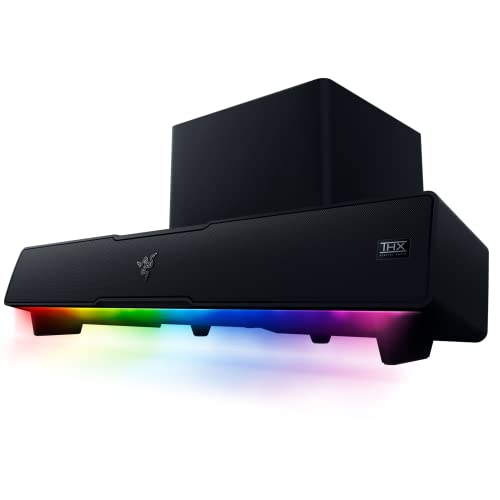
The Razer Leviathan V2 is a PC soundbar with a subwoofer, made for the narrow space between a desk and a monitor. It pairs a two-driver bar with a down-firing sub, adds Razer’s Chroma RGB lighting and offers THX Spatial Audio on Windows. This profile covers what Razer says about it, where it fits and where it does not, particularly if you are comparing it with soundbars for a living-room TV.
This profile rests on Razer’s official page, not on our own use of the soundbar. We organized its specifications and FAQ answers into a plain-English guide, noting where the page is silent. For how it ranks against the rest of our picks, see the best soundbars of 2026 comparison.
The Short Version
The Leviathan V2 is a desktop product first. It connects to a computer with USB, pairs with phones and the Nintendo Switch over Bluetooth 5.2, and puts a small subwoofer on the floor or desk for bass that desktop speakers often lack. If you sit at a PC for games, movies and music and want a single bar under the monitor, it covers that job with RGB lighting as a bonus.
It is not a TV soundbar. Razer’s page does not list HDMI, optical or aux inputs, so it will not plug into a TV’s ARC port. If you want a living-room bar, the Polk Signa S4 profile covers one with a wireless sub and eARC. If you want a smaller, bar-only desktop option, the Razer Leviathan V2 X is the compact sibling.
Key Specs According to Razer
These details come from Razer’s official Leviathan V2 page.
- Type: multi-driver PC soundbar and subwoofer. Razer says the system packs two full-range drivers, a down-firing subwoofer and more.
- Surround: THX Spatial Audio, described as 7.1 virtual surround, available only on Windows 10 64-bit or higher and activated through Razer Synapse.
- Connections: USB audio input to the PC, and Bluetooth 5.2 for phones, tablets and the Nintendo Switch.
- Ports on the bar: Type-C port, power port and subwoofer output port.
- Buttons: source, Bluetooth, power and volume.
- Lighting: Chroma RGB with 18 lighting zones.
- Software: Razer Synapse and Razer mobile apps for lighting and audio settings.
- Placement: compact desktop form factor, with two sets of detachable rubber feet to angle the bar.
Razer’s page does not list a width or a weight in the text we read, so check the specification table on the product page before measuring your desk.
The Subwoofer Question
Most desktop speaker sets either skip the subwoofer or ask for a lot of floor space. The Leviathan V2 includes a down-firing subwoofer, and Razer lists a dedicated subwoofer output port on the bar, so it appears to be wired rather than wireless, though Razer’s page does not spell that out. Plan on room near the bar for the cable and the sub itself. Down-firing means the driver points at the surface it sits on, which spreads bass more evenly but also means the surface matters. A solid floor works better than a shelf that can rattle.
For a desk setup, the benefit is more low end in games, movies and music than a small bar can deliver alone, without the footprint of a full 2.1 speaker set. If you share a wall with a neighbor, set the bass level conservatively, since a sub on the floor can carry through to the next unit.
THX Spatial Audio and Windows
Razer calls out THX Spatial Audio as the main sound feature. It is virtual 7.1 surround processing aimed at positional accuracy in games, and Razer says it works only on Windows 10 64-bit or higher and is enabled through Synapse. The FAQ describes it as 360-degree positional audio for games, music and movies.
Two cautions apply. First, virtual surround from a stereo-style soundbar is a software effect, not real rear speakers, and it will not match a headset or a true surround system. Whether you like it is a matter of taste, and you can turn it off. Second, the Windows requirement means a Mac or Linux user will use the Leviathan V2 as a regular soundbar. You would still have the bar, the sub and Bluetooth, but not the THX feature, and Razer’s page does not say how USB audio behaves on a Mac.
Connecting It
- PC or laptop with USB: plug into a USB port. Razer lists USB as the way to connect to a PC, so this is the main route.
- Phone or tablet: pair over Bluetooth 5.2. Razer describes low-latency Bluetooth for switching between PC and a mobile device.
- Nintendo Switch: Razer lists it as a Bluetooth-compatible device.
- Mac: Razer’s page describes only Windows for the THX feature and does not address macOS, so confirm Mac support with Razer before you buy.
- PlayStation, Xbox, TV: Razer’s page does not list a connection for these, such as HDMI or optical. We would not plan on using the Leviathan V2 with them. Bluetooth from a console is not described, so check Razer’s support pages before assuming it works.
- Switching sources: per Razer, set a secondary playback device in Synapse, then press and hold the Source button to switch.
Desk Placement and Angle
The bar is meant to slide under a monitor. Razer includes two sets of detachable rubber feet so that you can tilt the bar toward your ears. This matters on a desk, where a flat soundbar would fire along the desktop, and the right foot height can give a clearer sound at seated listening distance.
Measure your monitor stand height before you buy. If the monitor sits low or the stand has a narrow gap, the bar may not fit beneath the screen without blocking it. Placing the bar in front of the monitor base works too, if the monitor is tall enough.
RGB Lighting and Software
Razer’s Chroma RGB has 18 lighting zones on this model, and Razer says the lighting can react to supported games. The Synapse software, and Razer’s mobile apps, handle lighting and audio settings. If you do not like RGB, you can reduce or switch it off in the software. Razer’s page does not say which platforms the Synapse and mobile apps cover beyond the THX note above, so check before relying on them.
Pros and Cons
Pros
- Bar and down-firing subwoofer in one desktop system
- THX Spatial Audio on Windows
- USB audio and Bluetooth 5.2
- Detachable feet to angle the bar
- 18-zone Chroma RGB that you can customize
Cons
- No HDMI, optical or aux listed, so not for a TV
- THX is Windows-only and needs Synapse
- The subwoofer appears to be wired and needs space and power
- The bar needs a monitor setup that leaves room beneath it
Who Should Buy It
The Leviathan V2 is for a Windows PC owner who wants a visible step up from monitor speakers, who likes the idea of a sub and who is fine with RGB. It suits gamers who want positional audio effects without a headset, and anyone who uses a computer for movies and music at a desk. It is also a sensible choice for a dorm or home office where one bar and one sub replace a pair of speakers.
It is a poor fit for a TV. If you want a soundbar for a living-room TV, look at the Polk Signa S4 or the Fire TV Soundbar Plus. If your desk is small, or you do not want a subwoofer, the Razer Leviathan V2 X is smaller and powered by one USB-C cable.
What to Check Before You Buy
- Operating system: THX Spatial Audio needs Windows 10 64-bit or higher.
- Ports: you need a USB port for audio and a nearby outlet for power.
- Desk space: you need room under the monitor and a spot for the subwoofer.
- TV plans: if you might use it with a TV later, note that Razer does not list HDMI or optical inputs.
- Lighting: if you prefer no RGB, plan to adjust it in the software.
You can see the current price and variants here: Razer Leviathan V2 on Amazon. Buying through our link may earn a commission at no cost to you.
Sources